
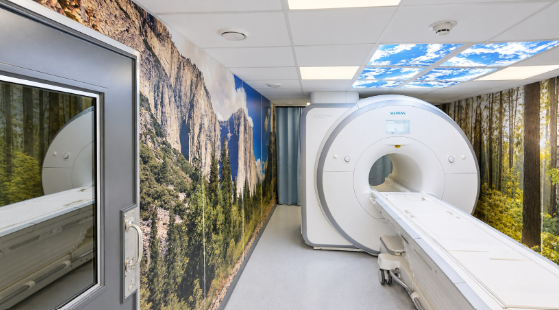

When a renovation, replacement, outage, or sustained capacity need threatens access to MRI services, Absolute Medical Imaging helps healthcare teams plan and deploy a Siemens mobile MRI environment around the clinical work, the site, and the people who depend on it.
Adding a mobile MRI affects more than equipment availability. Facilities, IT, imaging leadership, procurement, safety, patient access, and clinical operations must all align. Absolute helps organize those decisions early so the deployed Siemens configuration is matched to the actual need.
Absolute’s current Siemens mobile MRI assets include a large-footprint trailer environment with deployed stair and lift access, dedicated scanner and control spaces, integrated cabinetry, large windows, and the infrastructure required to support mobile imaging operations. The specific magnet model, software, coils, and patient-table configuration must be verified for the assigned unit.
Absolute begins with the intended exam mix, patient population, system preferences, coil and software needs, and deployment period. This helps keep the buying decision tied to the work rather than to a generic trailer description.
Available features may include expanded workspace, large MRI-safe windows, viewing windows in suite doors, lift access, stairs, dressing space, and organized wiring channels. Each feature should be confirmed on the assigned unit.
Power, cooling, networking, PACS connectivity, access, pad conditions, patient flow, permits, and readiness testing are included in the planning conversation before delivery.

Clarify what is creating the need, when the capacity must be available, the anticipated patient volume, the exam mix, and the operational consequences of delay.

Review the assigned magnet model, field strength, bore and table specifications, coils, software, applications, accessories, and service coverage. If a Siemens Aera configuration is proposed, verify the exact system and included capabilities in writing.

Coordinate delivery access, placement, pad, utilities, climate requirements, networking, PACS and worklist testing, patient route, lift or stair needs, and local compliance responsibilities.
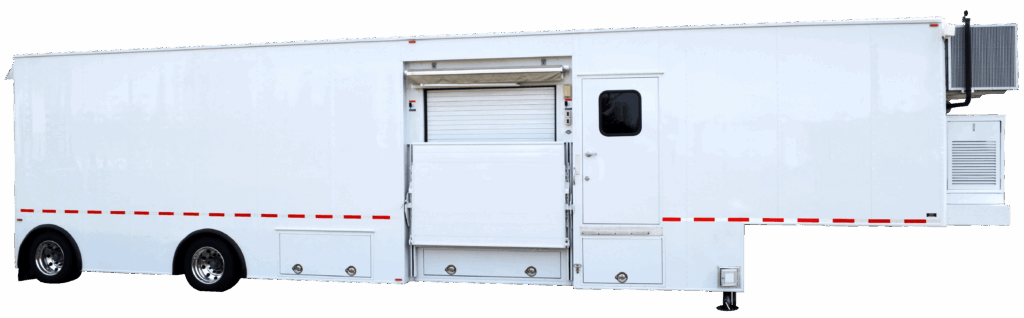
The product photos and 3D model assets show the exterior, deployed access systems, scanner room, control room, and circulation space. Use the model as a planning and marketing visualization, not as a substitute for the assigned unit’s approved specification sheet.
Current visual and 3D assets include a Siemens Aera-related mobile environment. Availability and the exact installed configuration must be confirmed for the proposed assignment.
That depends on the specific system, software, coils, exam mix, and clinical requirements. Your MRI leadership should review the proposed configuration before the unit is approved.
The deployment plan can include power, networking, PACS, modality worklist, and routing requirements. The hospital and deployment teams should define cybersecurity, testing, ownership, and go-live criteria in advance.
The photographed mobile environment includes deployed access equipment, and available units may include lift, stair, dressing-room, and ADA-oriented features. Confirm the exact unit and patient-flow plan before approval.
Share the timing, exam requirements, site conditions, and preferred Siemens workflow with Absolute. The team can then evaluate availability, configuration fit, and the work required to deploy with fewer surprises.
We use cookies to improve your experience on our site. By using our site, you consent to cookies.
Manage your cookie preferences below:
Essential cookies enable basic functions and are necessary for the proper function of the website.